
Guide · August 1, 2024
What Does an Instructional Designer Do?
Instructional design (ID) is the work of figuring out why people can't do something they need to do, then building the experience that closes the gap. The textbook version calls it a systematic process: study the learners, write clear objectives, build the materials, and measure the result. That's accurate, but it makes the job sound tidier and more mechanical than it is. What the work is like day to day is the more useful thing to understand.

Strip away the process diagrams and the day-to-day comes down to five things.
The job starts with a diagnosis, not a request
Clients rarely arrive with a problem. They arrive with a solution they’ve already chosen: we need a course on X, our people need more training, build us an onboarding module. A good designer treats that request as a symptom and goes looking for the cause behind it. That means interviewing stakeholders, talking to the people who’ll take the training, sometimes shadowing them on the job, and digging through whatever materials already exist. The question underneath all of it is simple and a little uncomfortable. Why isn’t the thing happening that’s supposed to happen?
Sometimes a genuine knowledge or skill gap is the answer, and training can close it. Often the cause turns out to be a broken process, an expectation no one made clear, or a tool people were never taught to use, and the most valuable thing a designer can do is say so. Recommending a fix that isn’t a course takes more nerve than building one, and it’s what separates a designer from an order-taker. Naming the right problem is half the work, and it’s the half nobody sees.
Your loyalty is to the learner, not the expert
Nearly every project pairs you with a subject-matter expert who knows the content cold and an audience that doesn’t. A big part of the job is translating between them. The expert wants to cover everything they know; the learner needs the smaller set of things that will help them do the work in front of them.
Good designers invest in understanding that learner: what they already know, the conditions they work under, where they tend to get stuck, and what would make the training feel worth their time. That picture, not the expert’s outline, is what the design gets built on. It’s also why empathy shows up on every list of instructional design skills. The craft depends on seeing the experience through the eyes of someone who doesn’t yet know what you know.
You design backward from what should change
The instinct, and the way most training still gets made, is to start with content. Collect everything there is to know about a topic, arrange it into slides, bolt a quiz onto the end. Backward design reverses that. You begin with what someone should be able to do differently when they’re finished, work out how you’d know they can do it, and only then design the activities and content that get them there.
It’s the difference between packing a suitcase before you know your destination and packing it once you do. That reversed order is also what keeps you from mistaking a polished presentation for real learning. A well-produced module is easy to sit through and easy to feel good about, right up until someone has to apply it and discovers the understanding was never there. Sitting through information and being able to use it are not the same thing, and good design is built around the second one.
The work is iterative, and messier than the diagrams suggest
Models like ADDIE lay the process out as clean, sequential steps. The real work loops. You build a rough version, put it in front of people, learn where your thinking was wrong, and go back. A first draft that survives contact with learners untouched is usually a draft nobody tested hard enough.
Around that loop is everything the diagrams leave out: stakeholders who want competing things, scope that creeps a little wider in every meeting, a subject-matter expert sitting on feedback you needed last week, a deadline, a budget. Much of the craft is managing the project and the people, not the learning design alone. The designers who do well are as comfortable running a kickoff meeting and holding a line on scope as they are writing a learning objective.
You’re measured on what changes, not on what you ship
Hitting the deadline and the budget is the floor, not the goal. Whether learners enjoyed the session is the easiest thing to measure and the least telling. The questions that count come later. Are people doing their jobs differently, and is that change moving something the organization cares about?
That standard shapes the design. Once you know you’ll be judged on behavior months down the line, you stop padding the run-time and start building in the practice, feedback, and real-world application that make a change hold. It’s also the part of the work that earns a seat at the table, because it ties what you build to outcomes a business already cares about instead of to slide counts and completion rates.
How a project actually moves: the 5D Spiral
Those five things aren’t a checklist you run once. At ID Atlas we map them onto a process we call the 5D Spiral, five phases that loop rather than march in a straight line. It covers the same ground as a model like ADDIE, with one difference that matters: analysis and evaluation aren’t steps you finish and leave behind, they run the whole way through.
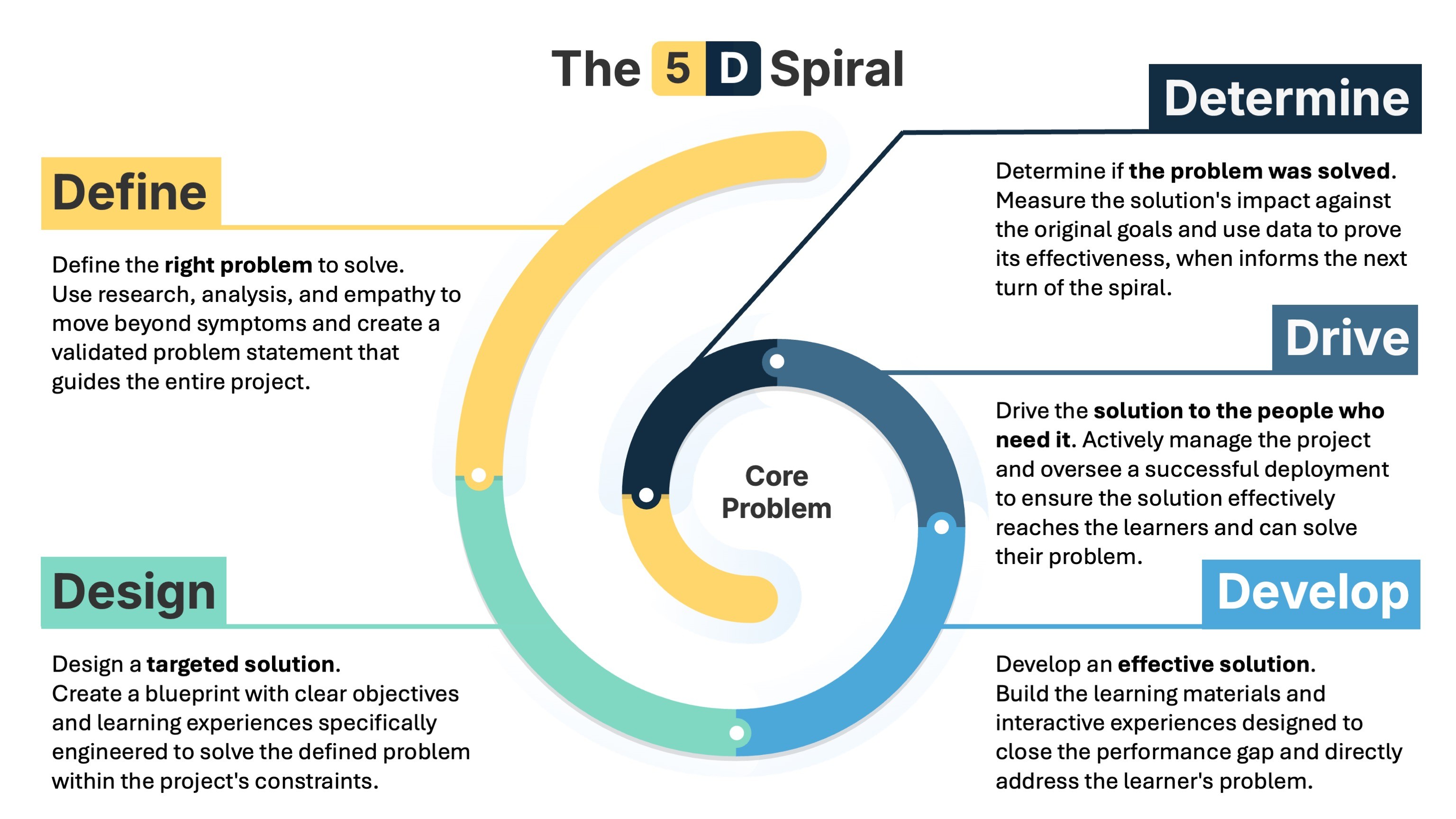
- Define. Pin down the real problem before anything else. Dig into why people aren’t performing and synthesize it into a validated problem statement aimed squarely at the performance gap. Is it a knowledge problem, a skill problem, or a confidence problem? You find out here.
- Design. Draw the blueprint: a project plan and an instructional strategy built to close that specific gap. This is also where you decide what success looks like and how you’ll measure it.
- Develop. Build the solution, grounded in human-centered design and adult learning, but not all at once. Work in iterative cycles, testing small pieces with real users so each part proves it works before the whole thing gets built.
- Drive. Launch day is the start, not the finish. Steer the solution toward impact by watching real usage and feedback against the success metrics, and pivot anything that isn’t landing.
- Determine. Measure the impact on the original problem. Because you set the metrics up front, the closing story isn’t completion rates, it’s whether the thing you set out to change actually changed. That answer feeds the next turn of the spiral.
It’s a spiral, not a circle, because every loop gets you closer to the bullseye instead of running the same lap again.
Where to go next
That’s the big picture. Explore ID job roles, discover your ideal sector, and identify your strengths with the interactive tools below.

ID Job Roles
The job title "Instructional Designer" can mean different things to different people. Check out this list of common job titles tied to instructional design and see which ones resonate most with you.
Explore Job Roles
ID Sector Quiz
Find out which area of the field you're most drawn to. Answer the questions and we'll match you to one of five sectors: Government, Education, Corporate, Non-Profit, or Freelance.
Take the Quiz
ID Skills Survey
Do you have the skills to be a great instructional designer? Uncover your hidden talents. Our survey matches your skills and instincts to one of 18 specialized sub-sectors.
Check Your Skills